How to activate Overrides at Consoles in Fortnite Chapter 7, season 4
Read the TDGN Briefing →
In Chapter Seven, season four of Fortnite, there are many ways you can completely alter the gameplay experience for everyone. Overrides are one such feature, and one of the key quests you’re tasked with checking off is to activate one at a Console.
There are lots of unique gaming-themed features to explore around the island since it’s the central theme, so finding what you need to enact this component can be tough. If you’re struggling to get it done, here’s how to activate Overrides at Consoles in Fortnite.
Table of contents
- What are Overrides in Fortnite?
- How to find Override Consoles in Fortnite
- Activate Overrides at Consoles in Fortnite
What are Overrides in Fortnite?

Overrides are server-wide rule changes you can enact by interacting with special Consoles around the Fortnite island. You have to be the first one to the Console to make it happen, and once you trigger an Override, your name is displayed on the Console base so everyone knows who activated the island-wide shift.
If you enact a Rare or Mythic Override, the effects only apply to you and your teammates. When these special, more powerful changes are triggered, your entire squad’s location will be revealed on the map to other players.
Every Override is unique, so what exactly happens to the island varies depending on which one you activate. Some of the possible effects you can trigger include increased XP gain from eliminations, boosted sprint speed over time, infinite stamina, faster fire and reload time for weapons, and turning all fishing spots golden.
How to find Override Consoles in Fortnite
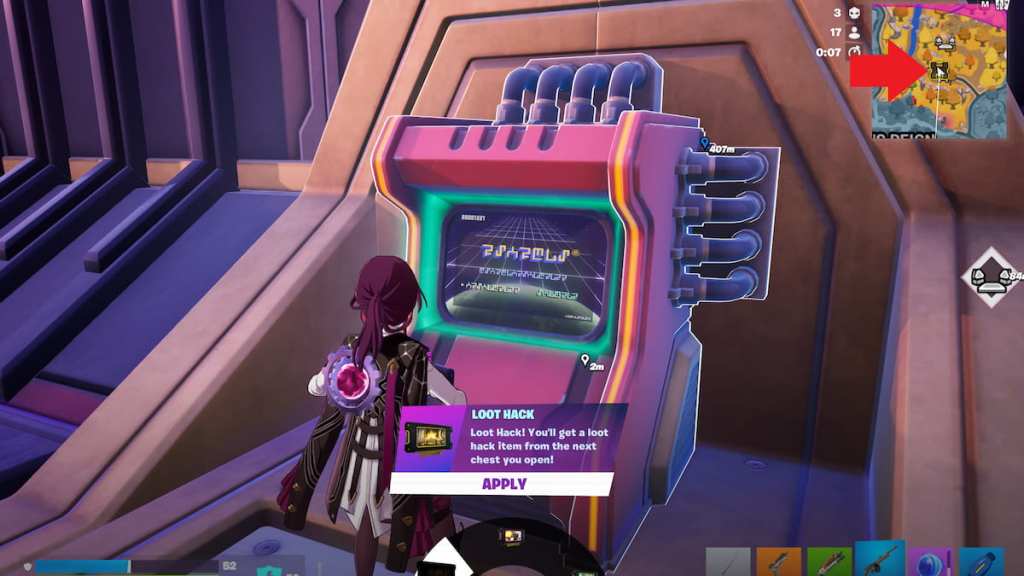
You can find Override Consoles on the island by looking for a special Console icon displayed on your map. While exploring, keep an eye on your mini map in the upper right corner. If you spot a special, animated Console icon, you’ve found the Override Console, and can then swiftly make your way to it to trigger a special new set of rules for the entire island.
Activate Overrides at Consoles in Fortnite
To complete the activate Overrides at Consoles quest, you need to find a Console and trigger an Override one time. You can freely choose from any of the available options to get this quest done, so pick whichever one you like best.
There’s plenty more to explore around the island this season. Next, you might consider entering all Lobby Hacks, getting all Chapter Seven, season four Sprites, and using Cheat Codes.
The post How to activate Overrides at Consoles in Fortnite Chapter 7, season 4 appeared first on Destructoid.